
Host the experiences white-label on your own domain

Holibob uses the delegated subdomain strategy to host our experiences white labels (WL) and send emails (if desired) on behalf of our partner’s domain.
By delegating a subdomain, you can configure your preferred subdomain to point to Holibob’s name servers. Any DNS-based questions will be referred to Holibob for resolution. This strategy only requires you to create a single DNS record at set-up and no more in the future. Holibob will create the rest in our system since the subdomain is delegated to Holibob.
This enables a seamless and quick set-up in three easy steps.
Once complete, please inform your Partner Success Manager
1. Selecting a SubDomain
We recommend selecting a SubDomain of “experiences” or “myexperiences”
An example URL for the experiences WL would therefore be experiences.airbnb.com or myexperiences.airbnb.com
2. Holibob sends partner DNS record
Once the SubDomain is agreed upon, Holibob will set up and send the required DNS record
3. Partners create a DNS record
Partners are then required to create a single DNS record in the following format. The four Name Server values should be entered in a single DNS record. Once this step is complete, please inform the Holibob team
Type | Name | Value |
|---|---|---|
NS (Name Server) | {{subdomain}} | {{nameservers}} |
Example of NS record
Partner Channel | Subdomain / Hosted Zone | Name Servers |
|---|---|---|
Holibob Partner 001 | ns-1294.awsdns-33.org. |
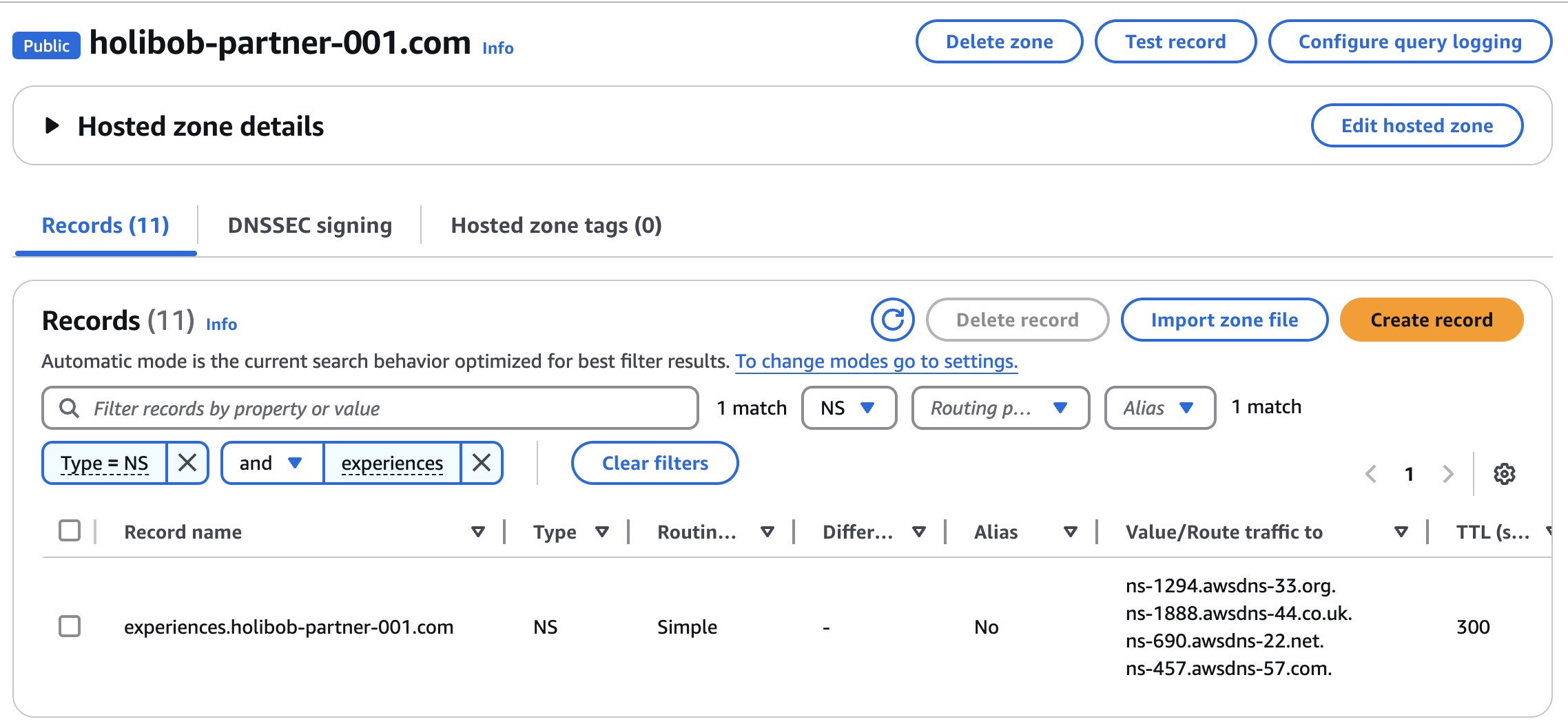
5. Inform your partner Success Manager once all the above steps are complete
We will then complete the final steps to make the site live